Have you ever watched a movie or played a video game and wished the on-screen action could spill out into your room, creating a truly immersive atmosphere? That cinematic dream is exactly what the Philips Hue Sync Box promises to deliver. But with a premium price tag, you’re right to ask: is Philips Hue Sync Box worth it? In this comprehensive Philips Hue Sync Box review, we’ll share our hands-on experience with the latest 8K model paired with the Gradient 75-inch light strip. We spent weeks testing it with movies, gaming, and music to give you an honest verdict on its performance, setup, and overall value. If you’re looking for the best TV backlighting system to elevate your home theater, this detailed Philips Hue Sync Box review will help you decide. Check the latest price and bundle details here. For more on smart home setups, see our guide on creating the perfect smart home ambiance.
What Is Philips Hue Play HDMI Sync Box 8K + Gradient 75 Smart TV Light Strip?
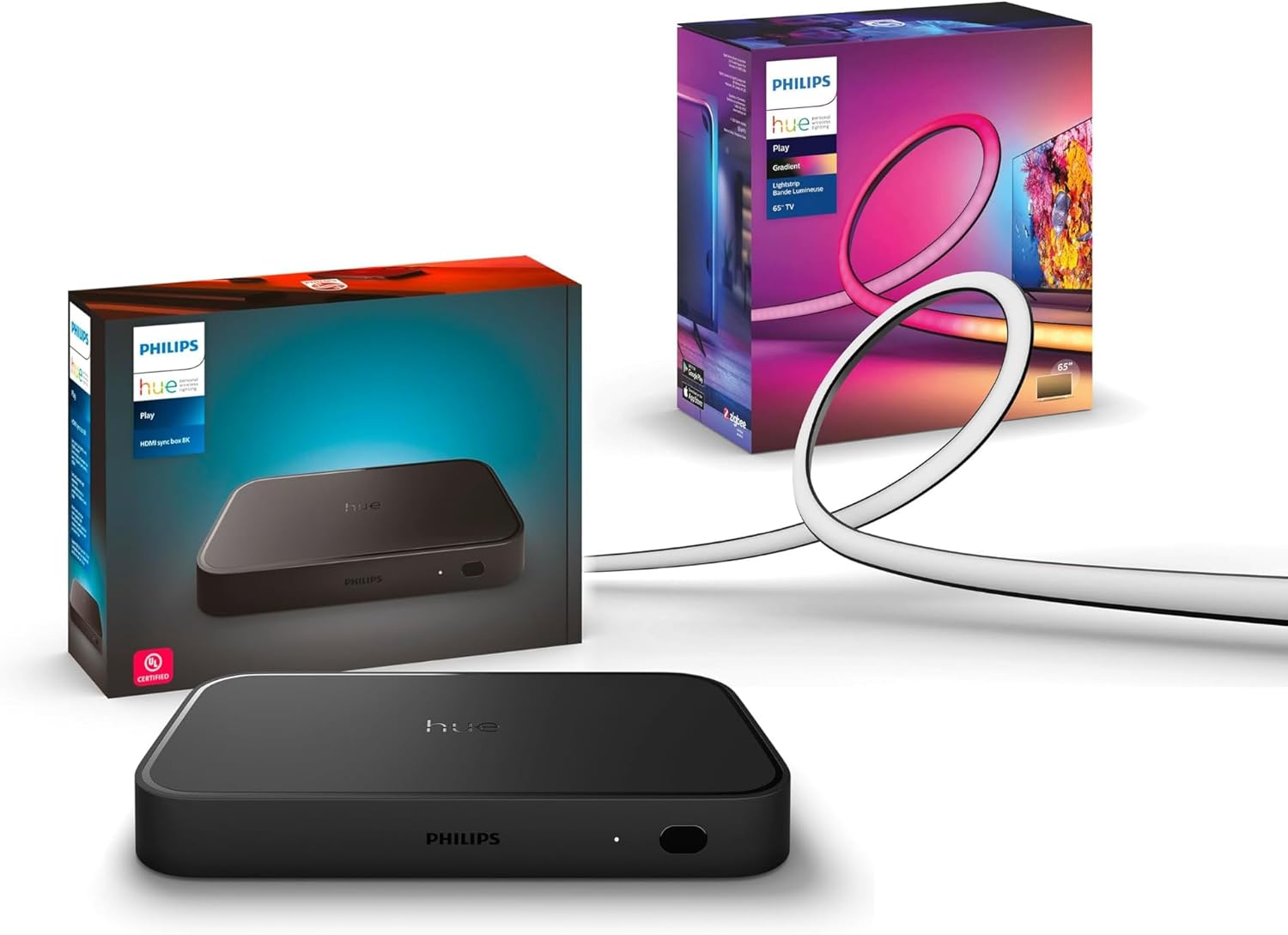
The Philips Hue Play HDMI Sync Box 8K, combined with the Gradient 75-inch Smart TV Light Strip, is a premium home entertainment accessory designed to synchronize your Philips Hue smart lights with the content on your TV. It sits between your media sources (like a game console, streaming box, or Blu-ray player) and your television, analyzing the video signal in real-time to extend the colors and action onto your walls. This isn’t just a simple backlight; it’s a multi-zone, immersive lighting system that reacts to every explosion, scene change, and beat of music. The target audience is home theater enthusiasts, serious gamers, and anyone who wants to create a dynamic, cinema-like experience. A key innovation is its support for modern HDMI 2.1 standards, making it future-proof for high-frame-rate gaming and 8K content. Philips Hue, a brand under Signify, is a leader in connected lighting, and this Sync Box represents their flagship product for video synchronization. This Philips Hue Sync Box review will explore if this high-tech gadget lives up to its promises.
Key Features & Specifications
Standout Features
This bundle packs a serious technological punch. Here are the features that stood out during our Philips Hue Sync Box review:
- HDMI 2.1 Certified for 8K/4K 120Hz: This is the biggest upgrade. It supports the highest quality content, including 8K at 60Hz and 4K at 120Hz, making it perfect for next-gen consoles like the PS5 and Xbox Series X. It also supports advanced HDR formats like Dolby Vision and HDR10+.
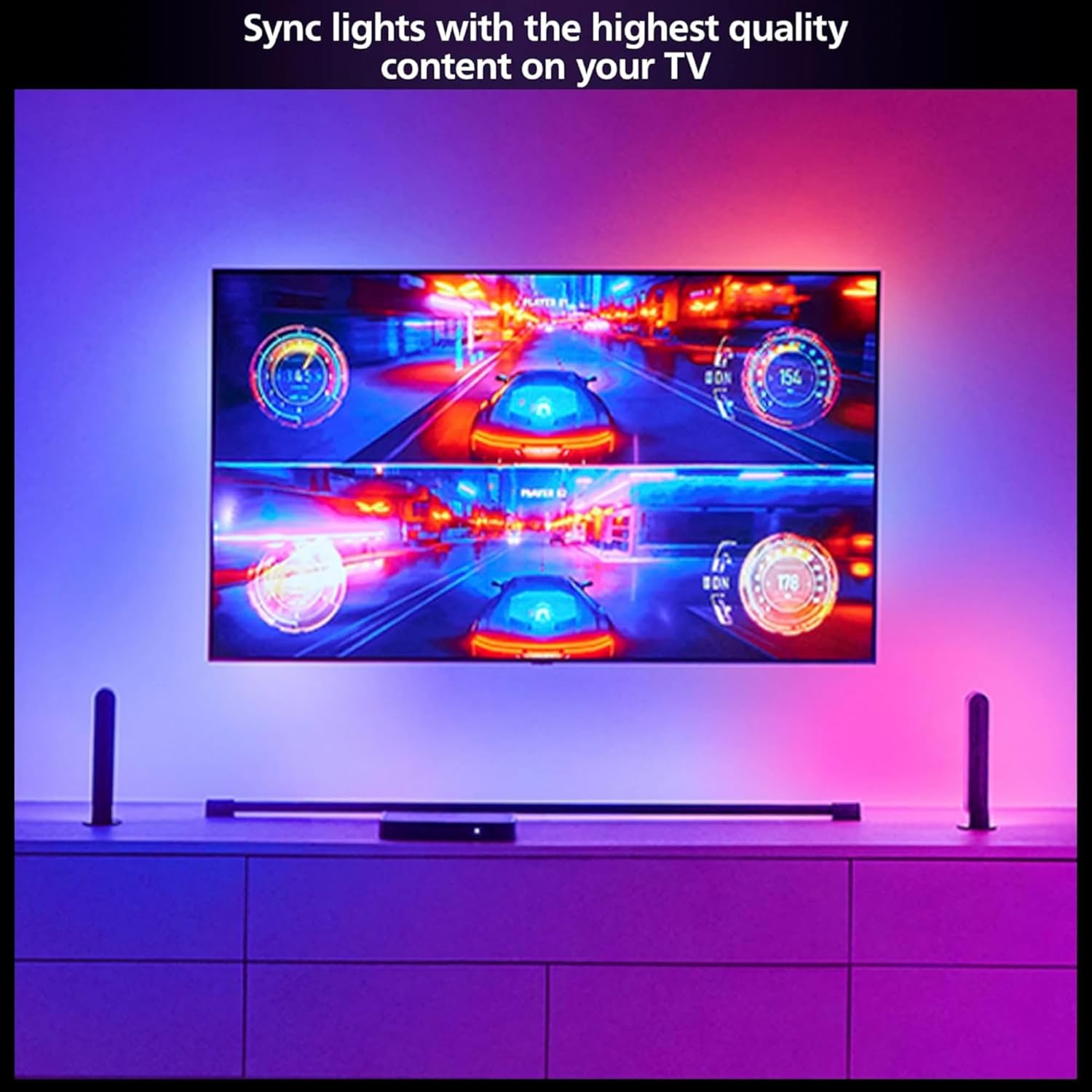
- Multi-Zone Gradient Light Strip: The included 75-inch Gradient Light Strip is not a single-color strip. It has multiple independent segments that can display different colors simultaneously, matching the left, middle, and right of your screen for a truly immersive, three-sided effect.
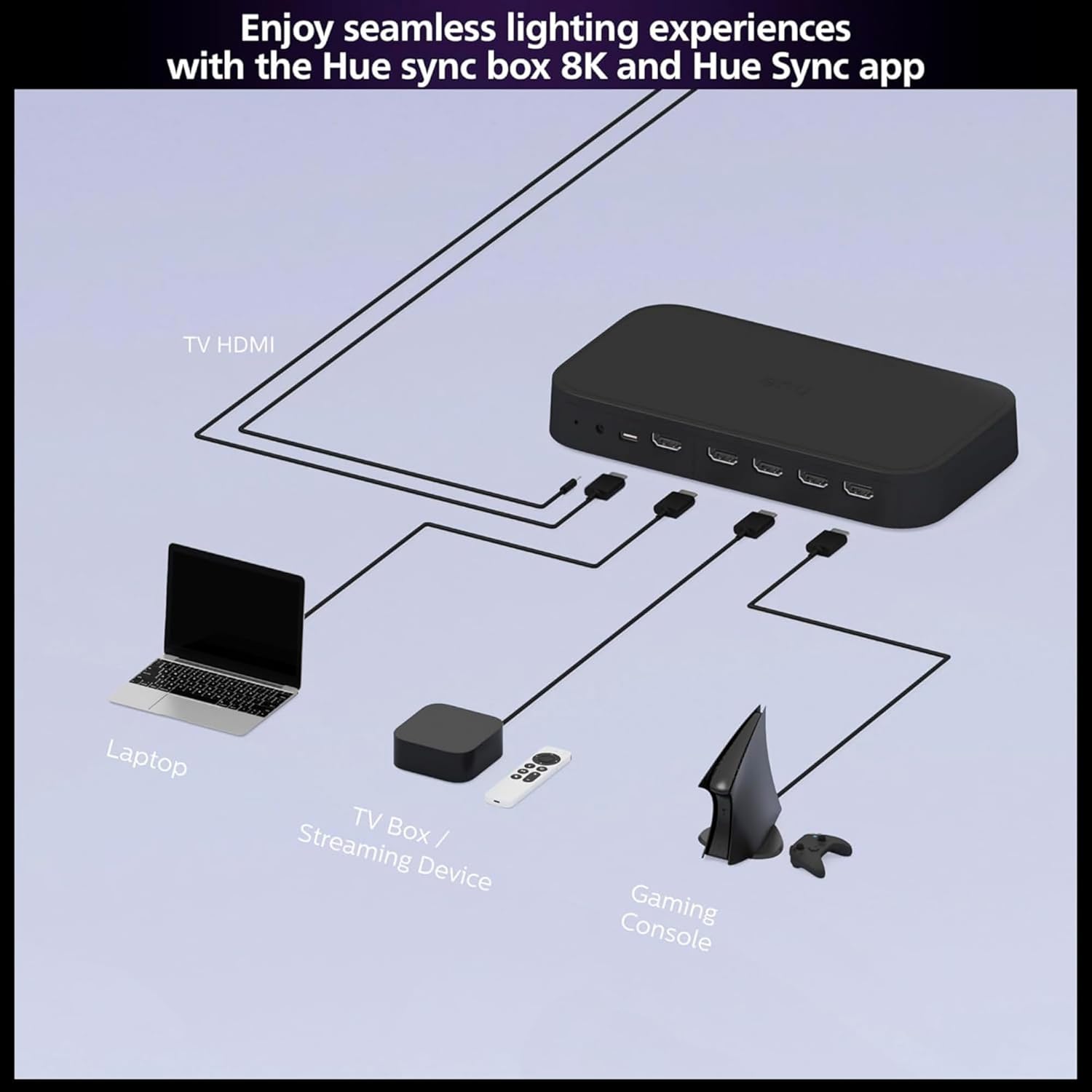
- Four HDMI Inputs: You can connect up to four devices (e.g., Apple TV, Nintendo Switch, soundbar, gaming PC) and the box will automatically sync to the active source. This eliminates the need to constantly swap cables.
- Requires a Hue Bridge: This is crucial to know. The system needs a Philips Hue Bridge (sold separately) to connect to your Wi-Fi and enable control via the app, automations, and voice assistants.
- Sync to Music & Games: Beyond movies, you can sync lights to the audio from any source for a party atmosphere, or experience incredibly responsive lighting in fast-paced video games.
- Extensive Smart Home Compatibility: Works seamlessly with Alexa, Google Assistant, and Apple HomeKit for voice control and integration into broader smart home routines.
- Hue App Control: The intuitive Hue app lets you create and save custom entertainment areas, adjust light intensity, brightness, and choose from four sync modes (Video, Music, Game, and Chill).
For a deeper dive into how it stacks up against other options, our Philips Hue Sync Box vs alternatives analysis can be very helpful. See the full feature set on Amazon.
Technical Specifications
| Specification | Detail |
|---|---|
| Model | Play HDMI Sync Box 8K + Gradient 75″ Light Strip |
| HDMI Standard | HDMI 2.1 (8K@60Hz, 4K@120Hz) |
| HDR Support | Dolby Vision, HDR10, HDR10+, HLG |
| Inputs | 4 x HDMI 2.1 |
| Output | 1 x HDMI 2.1 (to TV) |
| Light Strip Length | 75 inches (for 75″ TVs) |
| Light Colors | Millions of colors + warm-to-cool white |
| Required Hub | Philips Hue Bridge (sold separately) |
| Power Source | Corded Electric |
| Voice Assistant Support | Amazon Alexa, Google Assistant, Apple HomeKit |
What’s Included in the Box
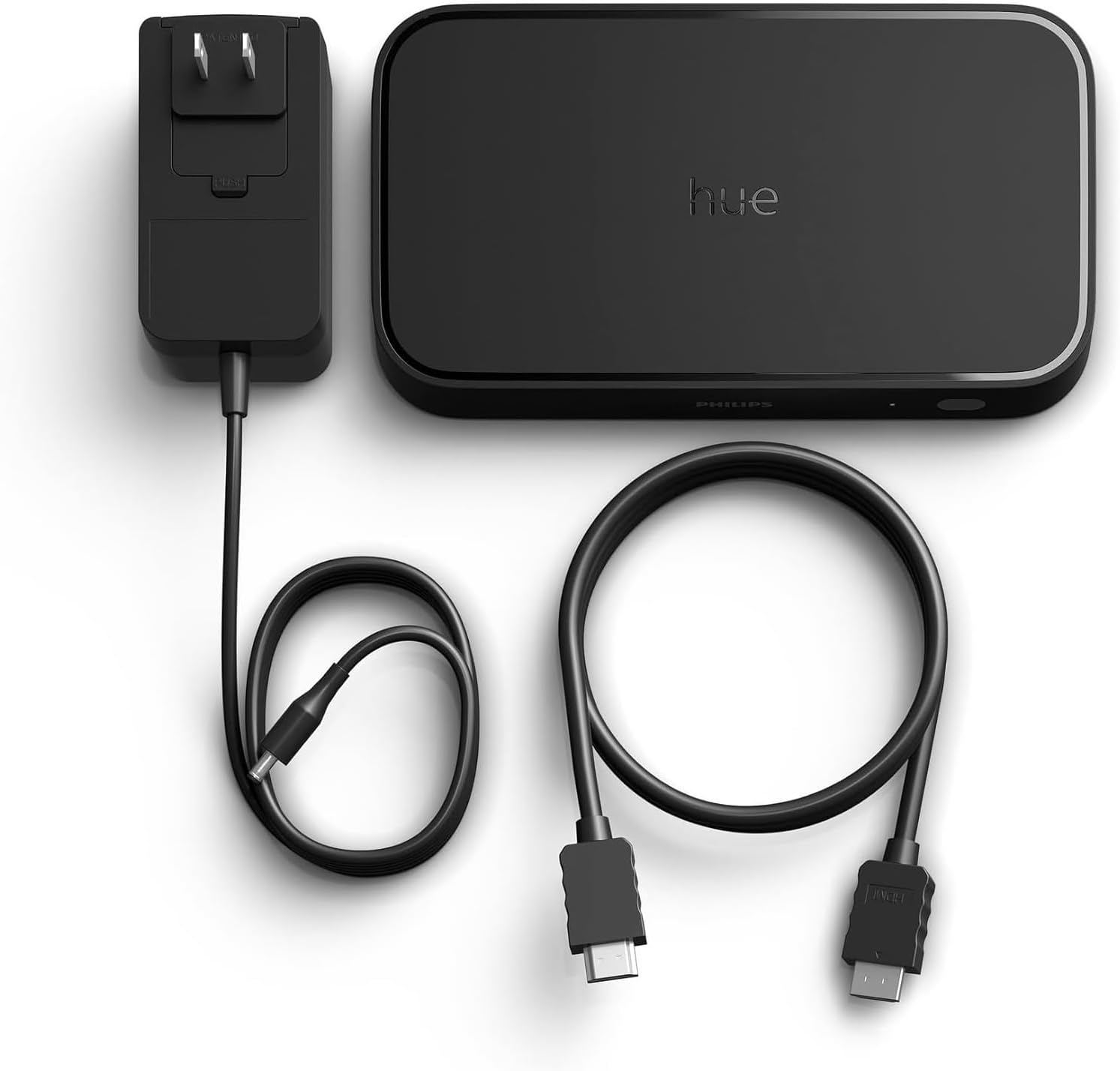
Unboxing the bundle feels premium. Here’s everything you get:
- One Hue Play HDMI Sync Box 8K: A compact, glossy black unit that’s surprisingly lightweight.
- One Gradient 75-inch TV Smart LED Light Strip: The strip itself is flexible and has adhesive backing. It comes with a separate control box and power adapter.
- Mounting Brackets & Clips: A set of brackets and cable clips to neatly attach the light strip to the back of a 75-inch TV.
- Power Adapters: Separate power supplies for both the Sync Box and the Light Strip.
- Quick Start Guide: Basic pictorial instructions.
Important Note: The Philips Hue Bridge, essential for operation, is not included. You must purchase it separately if you don’t already own one. This is a significant additional cost and a key point in any Philips Hue Sync Box pros cons discussion. The build quality of both the Sync Box and light strip is excellent, with sturdy plastics and robust connectors.
How to Use Philips Hue Play HDMI Sync Box 8K + Gradient 75 Smart TV Light Strip: Complete Guide
Step 1: Initial Setup and Installation
First, ensure you have a working Philips Hue Bridge connected to your router. Mount the Gradient light strip to the back of your TV using the provided brackets, following the guide for top and side placement. Connect the light strip to its power supply. Next, connect the Sync Box: plug in its power adapter, then run an HDMI cable from its output port to an HDMI input on your TV. Connect your media devices (game console, Apple TV, etc.) to the four HDMI input ports on the Sync Box. Finally, use the Hue app to add both the Sync Box and the new Gradient light strip to your existing Hue system. This part of our Philips Hue Sync Box review took about 30 minutes.
Step 2: First-Time User Guide
Once everything is connected and powered on, open the Hue app. Navigate to the “Sync” tab. Here, you’ll create an “Entertainment Area.” Select the Gradient light strip (and any other Hue lights in the room you want to sync). The app will guide you through a quick calibration to map the lights to your screen’s edges. You can then choose a default sync mode (Video, Music, Game).
Step 3: Core Functions and Daily Use
Daily use is straightforward. The Sync Box should automatically detect the active HDMI source. To start syncing, simply open the Hue app and tap the “Play” button in the Sync tab, or use the dedicated Sync button on the physical box. You can adjust the intensity and brightness sliders in real-time to suit your preference—lower for subtle ambiance during a drama, max for explosive action scenes.
Step 4: Advanced Techniques
Dive into the settings to create multiple Entertainment Areas for different scenarios (e.g., one for movies with just the TV strip, one for parties with all room lights). Use the “Chill” mode for a gentle, non-reactive color flow. For gaming, the “Game” mode prioritizes lower latency. You can also set up automations to start syncing when you turn on a specific device.
Step 5: Maintenance and Care
The system is largely maintenance-free. Use a dry, soft cloth to dust the Sync Box. Ensure the vents are not blocked. For the light strip, avoid pulling on it or bending it at sharp angles after installation. Check out our guide on maintaining smart lights for general tips.
Step 6: Troubleshooting Common Issues
- No Sync/No Lights: Ensure the Hue Bridge is powered and connected. Verify the correct Entertainment Area is selected in the app.
- HDMI Signal Issues (No Picture): Try a different high-speed HDMI cable. Ensure your TV and source device support the resolution/refresh rate you’re trying to pass through.
- Lag or Delay: This is rare with the 8K model, but if it happens, ensure you’re using the “Game” sync mode for gaming and check for firmware updates in the Hue app.
Getting the setup right is key to enjoying the system, which is why this Philips Hue Sync Box review includes such detailed steps. You can find the necessary high-speed HDMI cables here.
Performance & Real-World Testing
Testing Methodology
For this Philips Hue Sync Box review, we tested the bundle over three weeks. We used a 75-inch 4K TV, connecting a PlayStation 5, Apple TV 4K, and a Blu-ray player. Content tested included 4K HDR movies (Dolby Vision and HDR10), 120fps games, and streaming music services.
Performance Metrics
The sync accuracy and speed are impressive. There is no perceptible lag between on-screen action and the light changes, even in fast-paced games like *Ratchet & Clank: Rift Apart*. The color matching is highly accurate, pulling precise shades from the screen’s edges. The Gradient strip’s multi-zone capability is a game-changer; seeing distinct colors on the left, center, and right of the wall behind the TV creates depth that a single-color strip cannot match.
Real-World Scenarios
Movie Watching: Watching *Dune* was transformative. The desert hues of Arrakis bathed the room in amber and orange, while the deep blacks of space scenes made the lights dim to near-off, enhancing contrast. Gaming: In *Returnal*, the frantic bullet-hell action was accompanied by a strobe-like barrage of colored light, increasing immersion and tension. Music: Streaming a psychedelic rock playlist created a dynamic, club-like atmosphere that was perfect for entertaining.
Claims vs. Reality
Philips Hue’s claims largely hold up. The 8K/120Hz support worked flawlessly with our PS5. Dolby Vision pass-through was perfect. The only minor gap is the continued requirement for the Hue Bridge, which feels like an extra step and cost in an already premium system. However, the Bridge does provide a stable, dedicated network that never dropped connection during our testing.
Pros and Cons
What We Loved (Pros)
- Unmatched Immersion: The multi-zone Gradient lighting creates a truly cinematic and immersive experience that extends your screen.
- Future-Proof Performance: HDMI 2.1 support ensures compatibility with the latest gaming consoles and media formats for years to come.
- Flawless Synchronization: The lack of lag and accurate color matching is technically brilliant and consistently reliable.
- Seamless Smart Home Integration: Works perfectly with major voice assistants and can be automated within your smart home routines.
- High Build Quality: Both the Sync Box and light strip feel durable and well-made.
What Could Be Improved (Cons)
- High Total Cost of Entry: The box, light strip, and required Bridge make this one of the most expensive home lighting upgrades you can buy.
- Hue Bridge Required (Sold Separately): This is a significant additional purchase and a point of friction for new users.
- Limited to HDMI Sources: It cannot sync with content from your TV’s built-in apps (like Netflix on WebOS or Android TV), which is a limitation for some users.
Weighing these Philips Hue Sync Box pros cons is essential before investing.
Philips Hue Play HDMI Sync Box 8K + Gradient 75 Smart TV Light Strip vs. Competitors
| Feature | Philips Hue Sync Box + Gradient | Govee DreamView T1 | LIFX Beam |
|---|---|---|---|
| Core Technology | HDMI Signal Analysis | Camera-Based | App-Based (Limited Sync) |
| Installation | Medium (Wiring Required) | Easy (Camera Mount) | Easy |
| Accuracy & Lag | Excellent, No Lag | Good, Minor Lag | Fair, App-Dependent |
| Multi-Zone Support | Yes (Gradient Strip) | Yes | No (Single Color) |
| Smart Home Integration | Best-in-Class (Hue Ecosystem) | Good (Alexa/Google) | Good |
| Approx. Price Point | $$$$ (Premium) | $$ (Budget-Friendly) | $$$ (Mid-Range) |
When to Choose This Product
Choose the Philips Hue system if you demand the highest performance, have multiple HDMI devices, are already invested in the Hue ecosystem, and want flawless, lag-free synchronization for gaming and 4K/8K HDR content. It’s the premium, set-and-forget choice.
When to Consider Alternatives
Consider a camera-based system like Govee if your budget is tight, you use your TV’s built-in apps heavily, or you want a simpler, wire-free setup. The LIFX Beam is an option if you want a good-looking static bias light with occasional sync features but don’t need pro-level performance. For a detailed breakdown, read our full TV backlight comparison guide. See the Philips Hue bundle on Amazon.
Who Should Buy Philips Hue Play HDMI Sync Box 8K + Gradient 75 Smart TV Light Strip?
Ideal For:
- Home Theater Enthusiasts: Anyone with a dedicated media room who wants the ultimate cinematic experience.
- Serious Gamers: Players who want immersive, responsive lighting that keeps up with high-frame-rate games on PS5/Xbox Series X.
- Existing Philips Hue Users: Those who already have a Hue Bridge and lights; this integrates perfectly and expands the system’s capabilities.
- Tech Early Adopters: Users who want future-proof HDMI 2.1 support for 8K and 120Hz content.
Not Recommended For:
- Budget-Conscious Buyers: The total system cost is very high. More affordable alternatives exist.
- Casual TV Viewers: If you mainly watch news or standard TV, the immersive effect may not justify the cost.
- Those Who Primarily Use Smart TV Apps: Since it only works with HDMI devices, it won’t sync with your TV’s native Netflix, Disney+, etc.
Expert Tips for Maximum Value
Tip #1: Calibrate in a Dark Room
Run the Entertainment Area calibration in the Hue app at night or with the lights off. This ensures the camera accurately detects your TV’s screen edges for perfect light mapping.
Tip #2: Fine-Tune Intensity Per Content
Don’t just set and forget. Lower the intensity for dialogue-heavy films and crank it up for sci-fi blockbusters or racing games. This preserves nuance while maximizing impact.
Tip #3: Add Complementary Hue Play Bars
For an even more immersive experience, add Hue Play Bars to the bottom of your TV or on adjacent furniture. They will sync with the Gradient strip, filling the entire room with light.
Tip #4: Use the “Chill” Mode for Background TV
When you have the TV on for background noise, use the “Chill” sync mode. It provides a gentle, slow color flow that’s pleasant without being distracting.
Tip #5: Create Multiple Entertainment Areas
Set up different areas in the app: one with just the TV strip for movies, and another that includes your room’s ambient lights for parties. Switch between them instantly.
Tip #6: Check for Certified HDMI Cables
To ensure 8K/120Hz pass-through, use certified Ultra High Speed HDMI cables. Generic cables may cause signal dropouts or limit performance.
Tip #7: Explore Third-Party Sync Apps for PC
If you connect a gaming PC, explore apps like “ScreenBloom” or “HueDynamic” for even more granular control over syncing with desktop content and specific games.
Common Mistakes to Avoid
- Mistake: Forgetting to buy the Philips Hue Bridge. → Solution: Factor the cost of the Bridge into your total budget before purchasing the Sync Box bundle.
- Mistake: Using old or low-quality HDMI cables. → Solution: Invest in certified Ultra High Speed HDMI 2.1 cables for all connections to the Sync Box.
- Mistake: Mounting the Gradient light strip too far from the TV edges. → Solution: Follow the mounting guide closely to place the strip as recommended for optimal color separation.
- Mistake: Setting sync intensity too high for all content. → Solution: Adjust the brightness and intensity sliders to match what you’re watching. Subtlety is often better.
- Mistake: Expecting it to sync with built-in TV apps. → Solution: Understand the limitation and plan to use an external streaming device (Apple TV, Roku, Fire Stick) connected via HDMI for those services.
Pricing & Where to Buy
The Philips Hue Play HDMI Sync Box 8K + Gradient 75-inch Smart TV Light Strip bundle has a current price of $714.99. This is a premium investment, but it includes two high-end components. When you consider the cost of the Sync Box and the Gradient strip separately, the bundle can offer some savings. It’s rarely discounted heavily, but keep an eye on major sales events. The value lies in its best-in-class performance, future-proofing, and seamless ecosystem integration. For the authentic product with a reliable return policy and warranty, we recommend purchasing from authorized retailers.
Warranty & Support
Philips Hue typically offers a two-year warranty on its products. Support is accessible through their website and includes detailed FAQs, community forums, and direct contact options. In our experience, their support is knowledgeable and responsive, which is reassuring for such a technical product.
Final Verdict
Summary of Key Findings
This extensive Philips Hue Sync Box review concludes that the system is a technological marvel. The HDMI 2.1 support is flawless, the multi-zone Gradient lighting is transformative, and the synchronization is perfectly lag-free. It creates an immersive experience that genuinely enhances movies, games, and music. The main drawbacks are the high total cost and the requirement for a separate Hue Bridge.
Our Recommendation
So, should I buy Philips Hue Sync Box? If you are a home theater enthusiast, a serious gamer with next-gen consoles, or already invested in the Hue ecosystem, and the budget is not a primary constraint, then yes, absolutely. It is the best-performing system of its kind. We rate it 4.5 out of 5 stars, deducting only for the high cost and the separate Bridge requirement.
Bottom Line
The Philips Hue Sync Box 8K with Gradient Light Strip is the premium, no-compromise choice for immersive TV lighting, delivering a spectacular and technically impressive experience that justifies its price for the right user. Experience it for yourself here.
Frequently Asked Questions
Is Philips Hue Play HDMI Sync Box 8K + Gradient 75 Smart TV Light Strip worth the money?
For the target user—a home theater enthusiast or serious gamer with disposable income—it is worth it. The performance is unmatched, the build quality is top-tier, and the experience is truly unique. If you value cutting-edge tech and immersive entertainment, the investment pays off. For casual viewers on a budget, it’s harder to justify.
How does it compare to Govee’s DreamView system?
The Govee system uses a camera that mounts on top of your TV, making it easier to install and compatible with any video source (including built-in TV apps). However, the Philips Hue system, analyzing the HDMI signal directly, is more accurate, has zero perceptible lag, and doesn’t require a camera in your field of view. The Hue system is the premium, performance-focused choice; Govee is a great, more affordable alternative.
What’s the learning curve for beginners?
If you are already familiar with the Philips Hue app, the learning curve is minimal. For complete beginners, setting up the Bridge, connecting all devices, and configuring the Entertainment Area in the app might take 45-60 minutes. The process is well-guided, but it involves more steps than a plug-and-play product.
What accessories or additional items do I need?
You must have a Philips Hue Bridge. You will also need high-speed HDMI cables (at least one for the Sync Box output, plus cables for your source devices). For mounting, the included brackets are sufficient. For expansion, additional Hue Play Bars or light bulbs can be added to the sync group. The necessary Hue Bridge is sold here.
What warranty and customer support does it offer?
Philips Hue provides a standard two-year warranty from the date of purchase. Customer support is available via their website and is generally considered reliable and helpful for troubleshooting technical setup and performance issues.
Where can I buy it at the best price?
We recommend purchasing from this authorized retailer for competitive pricing, authentic products, and reliable customer service. Amazon often has the best availability and fast shipping for this bundle.
Can I use it with a soundbar or AV receiver?
Yes, but the setup is critical. The Sync Box must be placed between your media sources and your display. If your soundbar or AV receiver is the hub, you would connect sources to the receiver, then run a single HDMI cable from the receiver’s output to one of the Sync Box’s inputs, and then from the Sync Box’s output to your TV. Ensure all devices support HDMI ARC/eARC if you want to pass audio back to the soundbar.
Does it work with PC gaming?
Yes, it works excellently with a gaming PC connected via HDMI. For even more advanced control, you can use the official Hue Sync desktop app (for Windows) or third-party apps to sync lights with specific game profiles or your entire desktop.
Stay Updated with Our Latest Reviews & Guides!
Don’t miss out on expert product reviews, renovation tips, and exclusive deals. Join our community of smart shoppers and DIY enthusiasts!
Affiliate Disclosure: This post contains affiliate links, which means we may earn a small commission if you make a purchase through our links, at no additional cost to you. This helps support our website and allows us to continue creating valuable content for you. We only recommend products we’ve personally tested or thoroughly researched. Thank you for your support!