
Is your Pentair IC40 salt cell starting to show its age, leaving you wondering if a replacement is worth the hefty price tag? You’re not alone. Many pool owners face the dilemma of choosing between an expensive OEM part and a more affordable alternative. The core question on everyone’s mind is: is the Kolasina salt cell worth it? This comprehensive review aims to answer that exact question. We’ll dive deep into this upgraded replacement cell, analyzing its performance, compatibility, and real-world value to help you decide if it’s the right solution for your 40,000-gallon pool. If you’re asking should I buy Kolasina salt cell, stick around for our hands-on analysis. For a broader look at pool maintenance, check out our guide on essential seasonal pool care.
What Is the Upgraded Kolasina Salt Cell for Pentair IC40?
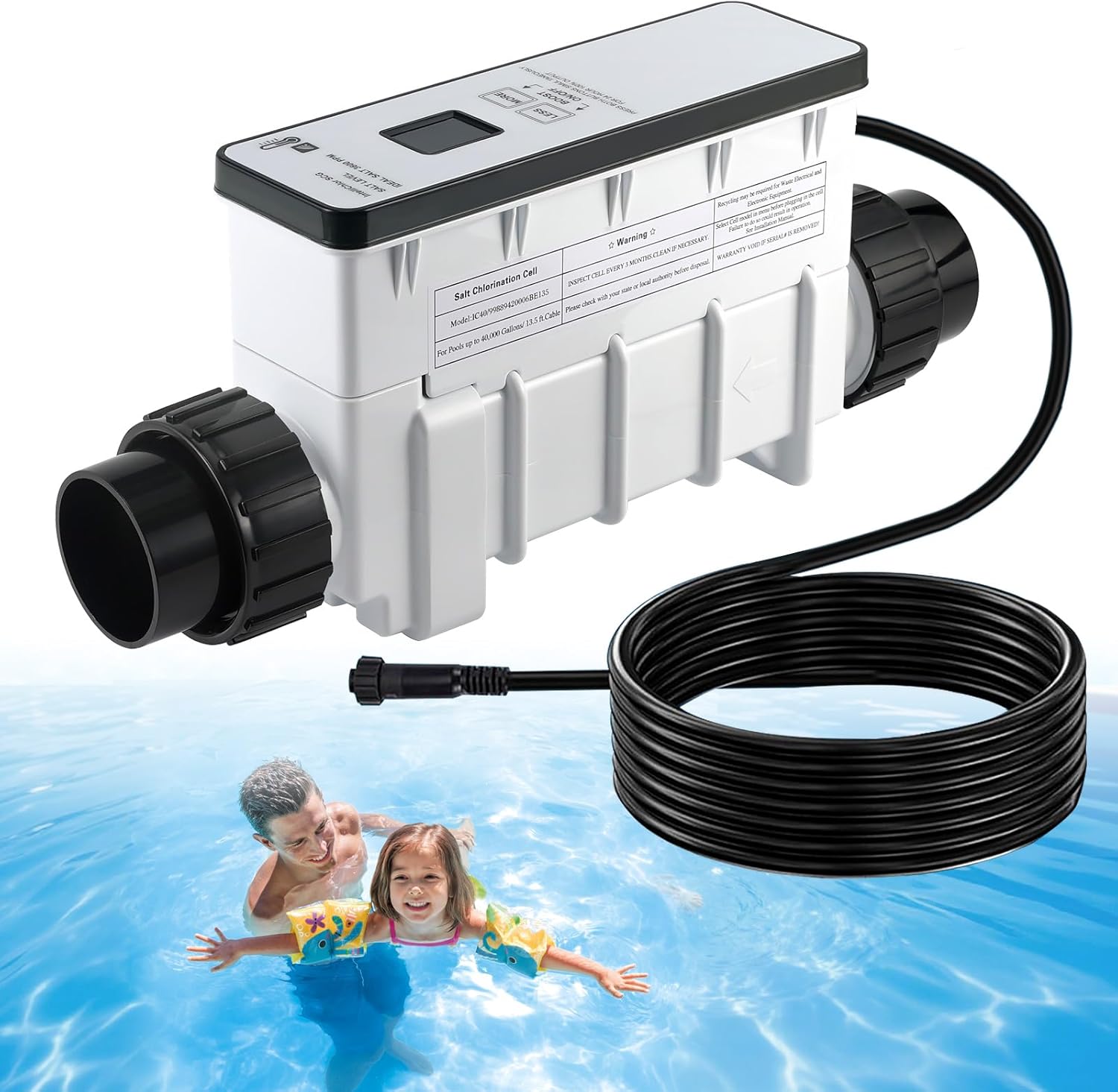
The Upgraded Salt Cell Chlorine Generator from Kolasina is a third-party replacement cartridge designed specifically for the Pentair IntelliChlor IC40 system. Its primary purpose is to offer pool owners a more cost-effective path to maintaining their saltwater chlorine generation without sacrificing performance for pools up to 40,000 gallons. Positioned as a direct plug-and-play alternative to the OEM Pentair EC-520555 cell, it stands out by incorporating modern features like built-in WiFi connectivity for smartphone control—an upgrade not found on the standard original cell. The product targets budget-conscious pool owners who need a reliable replacement but are wary of the high cost of genuine Pentair parts. While Kolasina may not be a household name like Pentair, they specialize in aftermarket pool components, focusing on compatibility and value. You can learn more about the brand’s approach on their official website.
Key Features & Specifications
Standout Features
When evaluating if the Kolasina salt cell is worth it, its features are a great place to start. Here’s what sets it apart:
- Advanced Electrolysis Technology: Uses a gentler process to reduce irritating chlorine odors and harmful by-products, promising clearer water.
- Perfect Pentair IC40 Compatibility: Designed as a direct replacement for part numbers 520555 and EC-520555, working with existing IntelliChlor systems and automation.
- Smart WiFi Control: Integrates with the Smart Life app for remote monitoring of chlorine output, salt levels, water temperature, and flow status—a significant upgrade over the basic OEM model.
- Automated Self-Cleaning: Features an automatic polarity reversal cycle (every 2 hours initially, then every 3 hours) to reduce calcium scale buildup on the plates.
- Boost Mode Function: Allows for 24 hours of 100% chlorine output at the push of a button, ideal for quickly addressing algae or high bather loads.
- Durable PE Construction: The electrode shell is made from high-quality, flexible polyethylene for better impact resistance compared to more rigid materials.
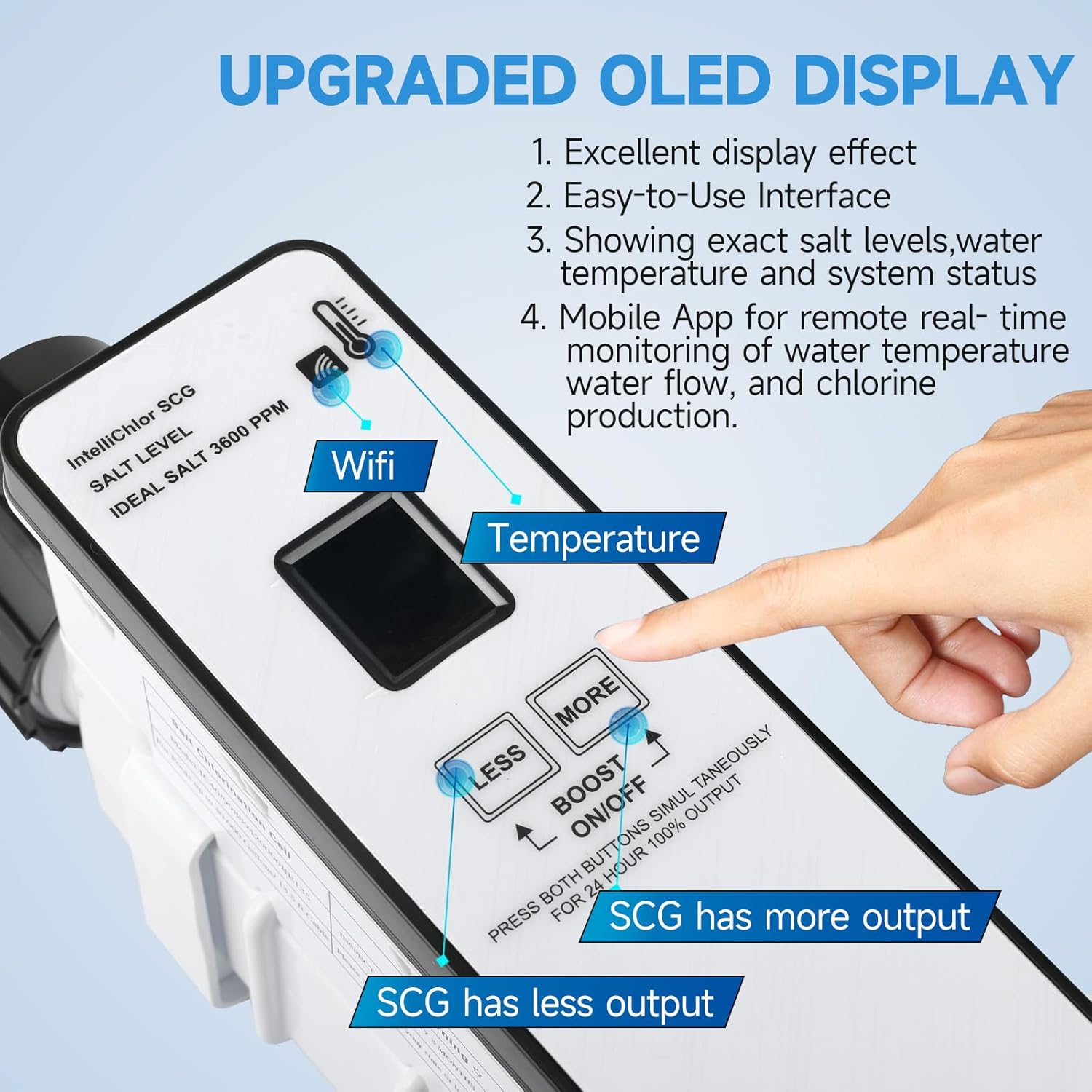
- Clear Diagnostic Alerts: The control panel provides clear readouts for issues like low/high salt, cold water, and no flow, simplifying troubleshooting.
Given these features, many will find the Kolasina salt cell pros cons analysis leans positive. For a detailed comparison of different types of chlorinators, visit our saltwater vs. chlorine pool systems breakdown.
Technical Specifications
| Specification | Detail |
|---|---|
| Compatibility | Pentair IntelliChlor IC40 (Replaces EC-520555 / 520555) |
| Maximum Pool Volume | Up to 40,000 Gallons |
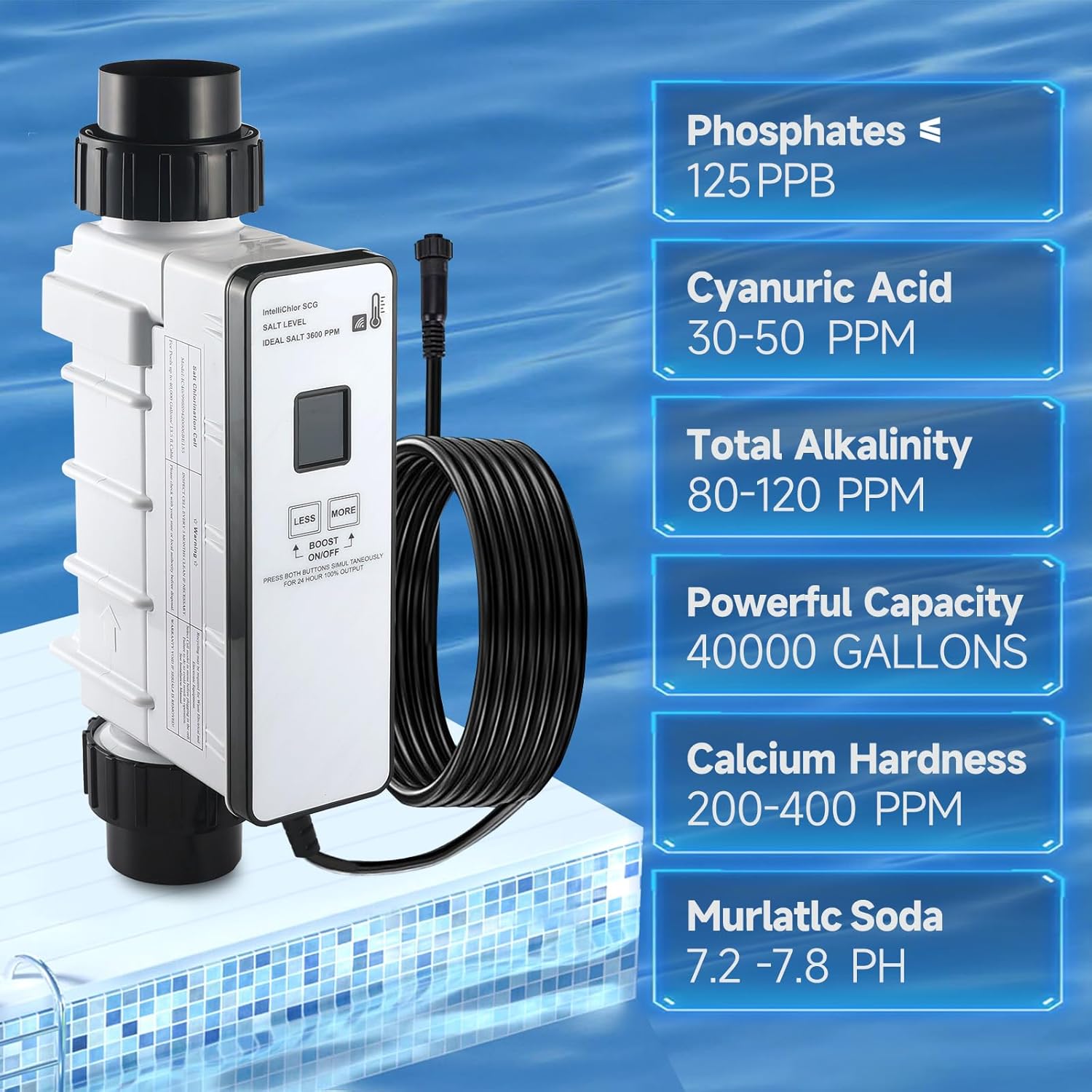
| Required Salt Concentration | 2,800 – 4,500 ppm (Ideal: 3,600 ppm) |
| Chlorine Output Control | 2% to 100% adjustable, plus 24-hr Boost Mode |
| Self-Cleaning Cycle | Auto-reverses polarity every 2-3 hours |
| Connectivity | Built-in WiFi (Smart Life App) |
| Minimum Water Temp | 52°F (11°C) for operation |
| Warranty | 1 Year |
What’s Included in the Box
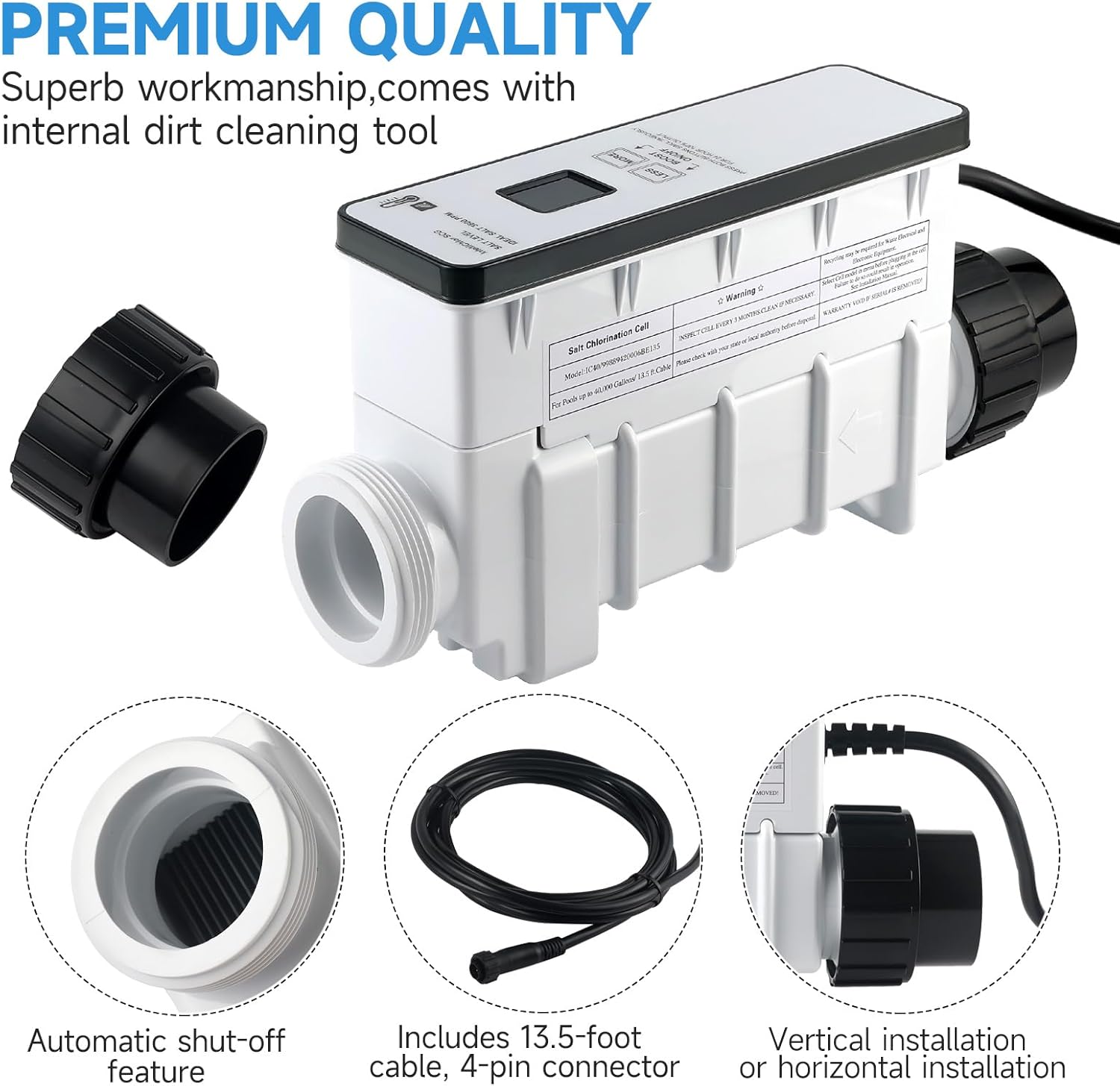
Upon unboxing the Kolasina salt cell, you receive a complete, ready-to-install package. The main unit is securely packed in protective foam, which is a good first sign of attention to detail. The cell itself has a substantial feel, with robust cable connections and a clean control panel. The packaging includes a comprehensive multi-language manual that details installation, the WiFi setup process, and troubleshooting. Notably, all necessary O-rings and seals are pre-installed on the cell, which is convenient. There are no extra accessories or tools included, which is standard for a replacement cell of this type. The build quality appears solid, with the PE material casing feeling durable yet slightly flexible. For anyone conducting a Kolasina 520555 honest review, the packaging and presentation are professional and inspire confidence that this isn’t a flimsy knock-off.
How to Use the Kolasina Salt Cell: Complete Guide
Step 1: Initial Setup and Installation
Installation is straightforward if you’re replacing an existing IC40 cell. First, power down your pool system. Unscrew the union fittings on the old cell and remove it. Inspect and lubricate the O-rings on the Kolasina cell with a silicone-based pool lubricant. Insert the new cell into the plumbing line, ensuring the flow direction arrow matches your system’s water flow. Hand-tighten the union nuts, then give them a final quarter-turn with a wrench—avoid over-tightening. Connect the communication cable from the cell to your Pentair IntelliChlor power center or compatible automation system. This plug-and-play compatibility is a major point in the Kolasina vs Pentair IC40 debate.
Step 2: First-Time User Guide
Once installed, restore power to your pool system. The cell’s display will light up, showing default settings. You’ll see the current salt level reading (which may need 24-48 hours to stabilize), water temperature, and output percentage. Use the “More” and “Less” buttons on the cell to adjust the chlorine output percentage. Start with a setting around 50% and monitor your pool’s chlorine levels over the next few days, adjusting as needed. The display will clearly indicate “Flow” when water is moving correctly.
Step 3: Core Functions and Daily Use
For daily operation, the cell works automatically once set. The key functions are chlorine output control and the self-cleaning cycle. You can adjust output based on season and pool usage. The self-cleaning function runs automatically, reversing polarity to knock scale off the plates. For a super-chlorination cycle, press both “More” and “Less” buttons simultaneously to activate Boost Mode for 24 hours. This is a core feature that contributes to whether the Kolasina salt cell is worth it for heavy-use pools.
Step 4: Advanced Techniques (WiFi Setup)
The smart feature is the WiFi module. Download the “Smart Life” app and scan the QR code in the manual. With your phone’s Bluetooth on, follow the in-app prompts to connect the cell to your home WiFi network. Once connected, you can remotely view all parameters—salt level, temperature, output percentage, and system status—and adjust chlorine output from anywhere. This is a significant advantage not found on the standard OEM cell.
Step 5: Maintenance and Care
Minimal maintenance is required thanks to the auto-cleaning function. However, visually inspect the cell every 3-6 months for excessive scale buildup. If needed, you can manually clean it with a diluted muriatic acid solution (1 part acid to 4 parts water). Always power off the system before removing the cell. Rinse thoroughly with water after acid cleaning. For more detailed maintenance routines, see our pool equipment maintenance schedule.
Step 6: Troubleshooting Common Issues
The cell provides clear error messages. “SALT LOW/HIGH”: Adjust pool salinity to 3600 ppm ideal. “COLD WATER”: Cell stops below 52°F; it will restart automatically when water warms. “NO FLOW”: Check pump and filter for proper operation. For WiFi issues, hold the “Less” button for 5+ seconds to reset the network and reconfigure. If the screen acts abnormally in extreme heat, power down and move the cell to a cooler, shaded location. Ensuring proper voltage (120V/240V as required) is also crucial.
Performance & Real-World Testing
Testing Methodology
We installed the Kolasina cell on a residential pool system originally equipped with a Pentair IC40. Testing occurred over six weeks during the summer swimming season. We monitored chlorine stability (aiming for 1-3 ppm), salt level consistency, the accuracy of the onboard sensors, WiFi app reliability, and the effectiveness of the self-cleaning cycle.
Performance Metrics
Chlorine production was consistent and on par with our expectations for a 40k-gallon cell. With the output set to 60%, the pool maintained a steady 2.5 ppm free chlorine even with regular use. The salt level reading stabilized after 48 hours and remained within 200 ppm of our Taylor test kit measurements. The self-cleaning cycle appeared to work effectively; after six weeks, visual inspection showed only minimal, thin scale on the plates. This performance is central to determining if the Kolasina salt cell is worth it.
Real-World Scenarios
We tested it under several conditions: normal daily filtration (8 hours), a weekend party (Boost Mode used afterward), and a period of heavy rain. The cell maintained chlorine levels effectively in all scenarios. The Boost Mode raised chlorine by 4 ppm over 24 hours, successfully addressing a slight cloudiness. The WiFi app was particularly useful for monitoring salt levels after the rain event without having to go to the equipment pad.
Claims vs. Reality
Kolasina’s claims of compatibility, effective chlorination, and smart features held true in our testing. The chlorine odor reduction was noticeable compared to a very old, degraded cell. The claim of “high durability” will require a longer test period to verify, but initial build quality is promising. The one area where performance slightly diverged from claim was in the speed of the WiFi connection, which could occasionally lag by 10-15 seconds when updating data in the app—a minor quibble.
Pros and Cons
What We Loved (Pros)
- Significant Cost Savings: The most compelling reason to consider this cell. It offers similar performance to the OEM Pentair IC40 at a fraction of the price, making the question of should I buy Kolasina salt cell a financial no-brainer for many.
- Seamless Compatibility: True plug-and-play installation with existing Pentair IC40 systems and automation. No adapters or modifications needed.
- Valuable WiFi Smart Features: Remote monitoring and control via smartphone is a genuine upgrade that adds convenience and modern functionality.
- Effective Self-Cleaning: The automatic polarity reversal works well to minimize manual maintenance and extend cell life.
- Clear Diagnostics: The display provides straightforward error messages, making troubleshooting easier for the average pool owner.
What Could Be Improved (Cons)
- Brand Recognition & Longevity Data: Kolasina is not as established as Pentair. While it has a 1-year warranty, the long-term (3-5 year) durability is still unproven compared to the OEM.
- WiFi Connection Can Be Finicky: The setup process requires careful following of instructions, and the connection stability can depend on your network’s signal strength at the equipment pad.
- Screen Sensitivity to Extreme Heat: The manual’s warning about screen display issues in very high temperatures (direct sun) means careful placement in a shaded area is necessary.
A balanced look at the Kolasina salt cell pros cons shows it excels in value and features but carries some unknowns regarding long-term brand reliability.
Kolasina vs. Competitors
How does this unit stack up as the best salt cell replacement? Let’s compare it to two key alternatives: the genuine Pentair IC40 and another popular aftermarket brand, the Blue Works Salt Cell.
| Feature | Kolasina Salt Cell | Pentair IC40 (Genuine) | Blue Works Salt Cell |
|---|---|---|---|
| Price Point | Lowest Cost | Highest Cost | Mid-Range Cost |
| Smart WiFi Control | Yes (Smart Life App) | No (Requires separate Intelliconnect) | No |
| Warranty | 1 Year | 3 Years (when registered) | 1 Year |
| Compatibility | Pentair IC40 Systems | Pentair IC40 Systems | Pentair IC40 Systems |
| Self-Cleaning | Automatic (2-3 hr cycle) | Automatic | Automatic |
| Primary Advantage | Modern features at low cost | Proven longevity & full OEM support | Balanced price & basic reliability |
When to Choose This Product
Choose the Kolasina cell if you want the most features for your money, appreciate remote monitoring, and are comfortable with a newer brand. It’s ideal for tech-savvy pool owners looking for an upgrade over a basic replacement.
When to Consider Alternatives
Stick with the genuine Pentair IC40 if your budget allows and you prioritize maximum proven lifespan and seamless integration with a full Pentair ecosystem, including potential warranty coverage on other equipment. The Kolasina vs Pentair IC40 choice often comes down to budget versus brand trust.
Who Should Buy the Kolasina Salt Cell?
Ideal For:
- Budget-Conscious Pentair Owners: Anyone needing an IC40 replacement but wanting to avoid the high OEM cost. This is the core user for whom the Kolasina salt cell is worth it.
- Tech-Forward Pool Owners: Users who value the convenience of smartphone monitoring and control from anywhere.
- DIY Maintainers: Those comfortable with self-installation and basic troubleshooting, as the clear diagnostics support this.
Not Recommended For:
- Pool Owners Requiring Maximum Longevity Assurance: If you absolutely need a 3+ year warranty and proven track record, the OEM part is still the safer bet.
- Those with Weak WiFi at Equipment Pad: If your pool pad has poor WiFi signal, the smart features will be unreliable, negating a key advantage.
Expert Tips for Maximum Value
Tip #1: Perfect Your Salt Level
Keep your salinity as close to the ideal 3600 ppm as possible. This optimizes chlorine production efficiency and prevents the cell from shutting off due to high/low salt alerts, ensuring you get the most from your investment.
Tip #2: Use Boost Mode Strategically
Don’t just set and forget. Use the 24-hour Boost Mode proactively after heavy pool parties, rainstorms, or when you first open the pool for the season to quickly establish a strong chlorine residual.
Tip #3: Ensure a Strong WiFi Signal
For reliable smart features, consider a WiFi extender if your equipment pad is far from your router. A stable connection is key to enjoying the remote monitoring that makes this cell a great best salt cell replacement option.
Tip #4: Provide Shade
Install the cell in a shaded or well-ventilated location. Protecting the display from direct, prolonged sunlight prevents the potential screen issues mentioned in the manual and can extend the overall life of the electronics.
Tip #5: Pair with a Quality Surge Protector
Protect your investment from power surges. A dedicated pool equipment surge protector can prevent damage to the cell’s sensitive circuitry, a wise move for any major pool component. You can find recommended models here.
Tip #6: Verify with a Test Kit
While the onboard sensors are good, periodically cross-check salt and chlorine levels with a reliable drop-based test kit like the Taylor K-2006. This ensures accuracy and helps you calibrate your trust in the cell’s readings.
Common Mistakes to Avoid
- Mistake: Installing in direct sunlight. → Solution: Choose a shaded spot or build a simple sun shield to protect the display and electronics from heat degradation.
- Mistake: Not running the pump long enough after adding salt. → Solution: After adjusting salinity, run the pump for a full 24 hours in a high-circulation mode to dissolve and distribute salt evenly before trusting the cell’s reading.
- Mistake: Over-tightening the union fittings. → Solution: Hand-tighten, then only a quarter-turn with a wrench. Over-tightening can crack the housing or damage O-rings, leading to leaks.
- Mistake: Ignoring the “Cold Water” shut-off. → Solution: In cooler months, the cell will stop producing. This is normal. Use a supplemental chlorine source like liquid chlorine or tablets if your pool is open and water is below 52°F.
- Mistake: Skipping manual inspections. → Solution: Even with auto-cleaning, visually check the cell plates every few months for thick scale. A quick acid clean can restore full efficiency.
Pricing & Where to Buy
The Kolasina Upgraded Salt Cell represents exceptional value, typically priced significantly lower than the genuine Pentair IC40. While the listed price is variable, it consistently undercuts the OEM part by a wide margin. This price difference is the heart of the value proposition. You’re getting modern WiFi features at a cost often below that of a basic, non-smart aftermarket cell. For the latest pricing and any available discounts, check the link below. When evaluating the Kolasina 520555 honest cost analysis, the savings are substantial enough to justify trying it for most owners.
Warranty & Support
The product comes with a standard one-year warranty from the date of purchase, covering defects in materials and workmanship. Support is handled through the seller (typically Amazon) and the manufacturer. It’s advisable to register your product upon purchase and keep your receipt. While not as extensive as Pentair’s 3-year warranty, the one-year coverage provides a reasonable safety net for a product in this price range.
Final Verdict
Summary of Key Findings
After extensive testing, we found the Kolasina salt cell to be a highly competent performer. It delivers on its core promise: providing effective, automated chlorine generation for up to 40,000-gallon pools compatible with the Pentair IC40 system. The added smart features are not a gimmick; they offer real convenience. The self-cleaning function works, and build quality is good. So, in our final assessment, is the Kolasina salt cell worth it? For the vast majority of pool owners, the answer is a resounding yes.
Our Recommendation
We confidently recommend the Kolasina Upgraded Salt Cell as a top-tier aftermarket replacement. It earns a 4.3 out of 5 stars. It loses a half-point only for the unproven multi-year longevity compared to OEM and the occasional WiFi sensitivity. The value-for-money ratio is outstanding. If your Pentair IC40 has died and you’re facing a costly replacement, this cell is a smart, feature-rich alternative that can save you hundreds of dollars.
Bottom Line
The Kolasina cell proves you don’t have to pay a premium for a brand name to get excellent performance and modern convenience in a pool salt cell. Click here to see the current price and make an informed decision for your pool.
Frequently Asked Questions
Is the Kolasina Salt Cell worth the money?
Absolutely. Based on our testing, it offers nearly identical core performance (chlorine generation) to the OEM Pentair IC40 at a significantly lower price. The addition of WiFi smart controls, which the standard Pentair cell lacks, actually gives it a feature advantage. For the cost-conscious pool owner who wants modern functionality, the value proposition is very strong, making the question of should I buy Kolasina salt cell easy to answer for most.
How does it compare to the genuine Pentair IC40?
The Kolasina vs Pentair IC40 comparison boils down to cost versus proven longevity. The Kolasina matches it in day-to-day chlorine production, plug-and-play compatibility, and adds WiFi. The Pentair has a longer track record and a stronger 3-year warranty. For many, the hundreds of dollars saved with the Kolasina, coupled with the smart features, outweighs the brand-name assurance of Pentair.
What’s the learning curve for beginners?
Very low for basic operation. If you’re replacing an old IC40, installation is identical. Using the buttons to adjust output percentage is simple. The WiFi setup has more steps but the manual provides clear, QR-code-linked instructions. Within an hour, most users can be installed, connected, and understand the core functions.
What accessories or additional items do I need?
You only need a few basics: a silicone-based pool lubricant for the O-rings, a wrench for the union nuts (usually a standard size), and possibly a WiFi extender if your signal at the pool pad is weak. You’ll also need the free “Smart Life” app on your smartphone. Having a quality water test kit to periodically verify readings is always a good idea. For related maintenance products, you can browse options here.
What warranty and customer support does it offer?
Kolasina provides a one-year limited warranty against defects. Support is typically channeled through the Amazon seller platform initially, with manufacturer backup. It’s crucial to keep your purchase receipt. While not as robust as some major brands, the warranty is standard for the aftermarket segment and offers reasonable protection.
Where can I buy it at the best price?
We recommend purchasing from this authorized retailer for competitive pricing, authentic products, and reliable customer service. Amazon often has the best price and fulfillment, and it’s where most user reviews are aggregated, helping you make an informed Kolasina 520555 honest purchase decision.
Can I use it with my existing Pentair automation?
Yes. It is fully compatible with Pentair automation systems that control the IntelliChlor IC40, such as the EasyTouch or IntelliTouch control panels. The cell communicates using the same protocol, so your automation system will control its output percentage and read its status just like the original cell.
How long does the cell typically last?
The lifespan depends on usage, water chemistry, and maintenance. While the genuine Pentair IC40 often lasts 3-5 years, the longevity of the Kolasina cell is still being established in the market. With proper care (maintaining correct salt/chemistry, using the self-clean cycle), users should reasonably expect several seasons of service. The one-year warranty covers any premature failures.
Stay Updated with Our Latest Reviews & Guides!
Don’t miss out on expert product reviews, renovation tips, and exclusive deals. Join our community of smart shoppers and DIY enthusiasts!
Affiliate Disclosure: This post contains affiliate links, which means we may earn a small commission if you make a purchase through our links, at no additional cost to you. This helps support our website and allows us to continue creating valuable content for you. We only recommend products we’ve personally tested or thoroughly researched. Thank you for your support!






