
Are you a professional mechanic or serious DIYer wondering if the latest diagnostic scanner is worth the investment? You’re not alone. With the rapid evolution of vehicle technology, having a powerful, future-proof tool is no longer a luxury—it’s a necessity. The question on many techs’ minds is: is the Autel MS906MAX worth buying? After weeks of hands-on testing in a busy shop environment, we can provide a definitive answer. This comprehensive review will break down every aspect of the Autel MaxiSys MS906MAX, from its massive 10.1-inch screen to its cutting-edge DoIP and CAN FD support. If you’re debating an upgrade from an older Autel model like the MS906BT or are choosing between the Autel MS906MAX vs MS906 Pro, this honest assessment is for you. We’ll cover performance, real-world use, and whether this tool truly lives up to its “top scan tool” claims. For a deep dive into the initial specs, you can read our first look here. Ready to see if this is the right tool for your bench? Check the latest price and availability on Amazon.
What Is Autel MaxiSys MS906MAX 2026?
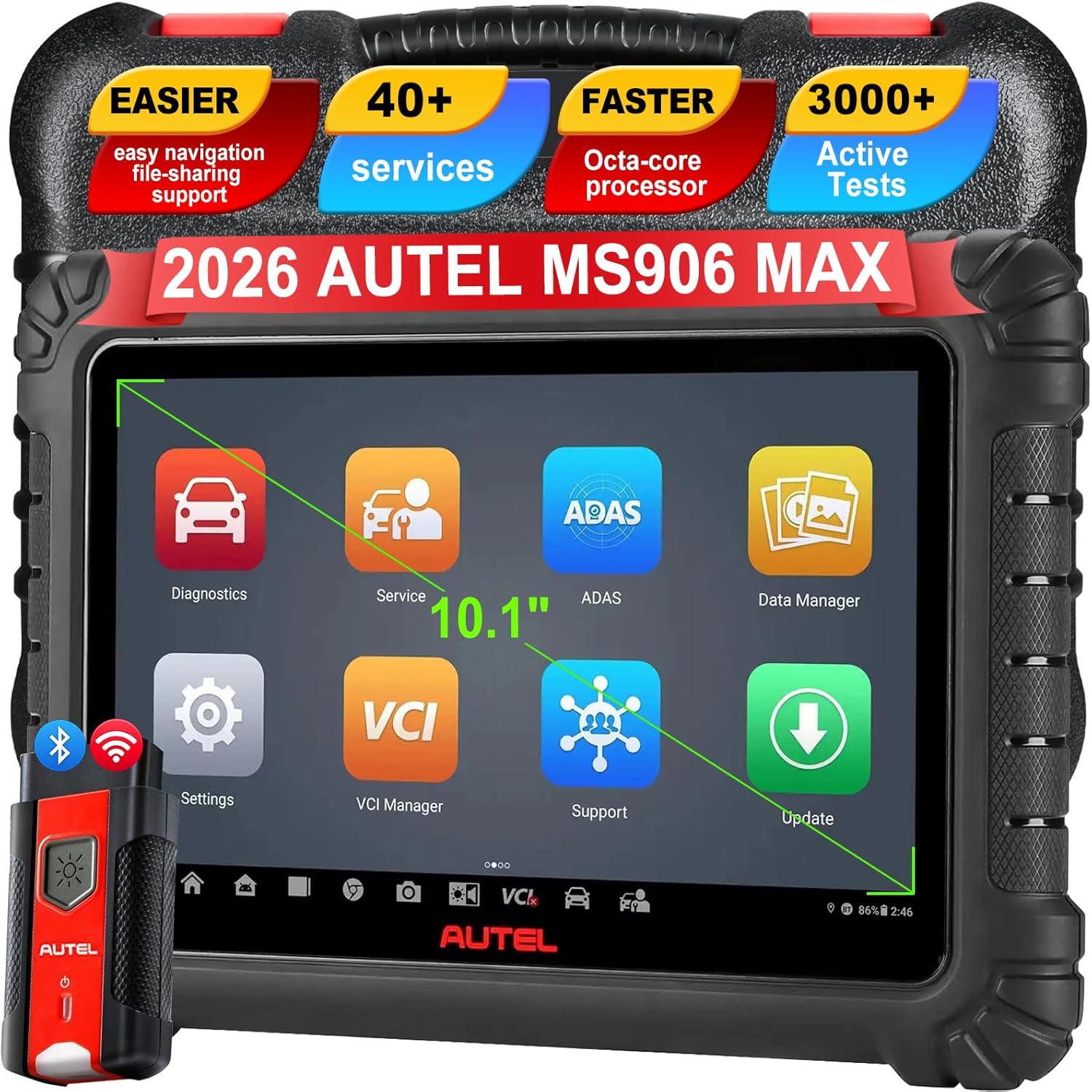
The Autel MaxiSys MS906MAX is the flagship professional diagnostic tablet released in late 2024, positioned as a significant generational leap over its predecessors. It’s designed specifically for professional automotive technicians, independent shop owners, and fleet managers who require OE-level diagnostics, advanced coding, and full-system bidirectional controls. Its primary purpose is to be a single, comprehensive tool capable of servicing virtually any vehicle from 1996 to the present, including the latest models with complex network architectures. The key innovations here are its support for Diagnostic over Internet Protocol (DoIP) and CAN FD, which are essential for modern vehicle communications, along with a more powerful hardware suite. Autel has built a strong reputation in the aftermarket diagnostic space, and you can learn more about their technology roadmap on their official website. For anyone conducting a serious Autel MS906MAX honest assessment, it’s clear this device aims to be the central nervous system of a modern repair shop.
Key Features & Specifications
Standout Features
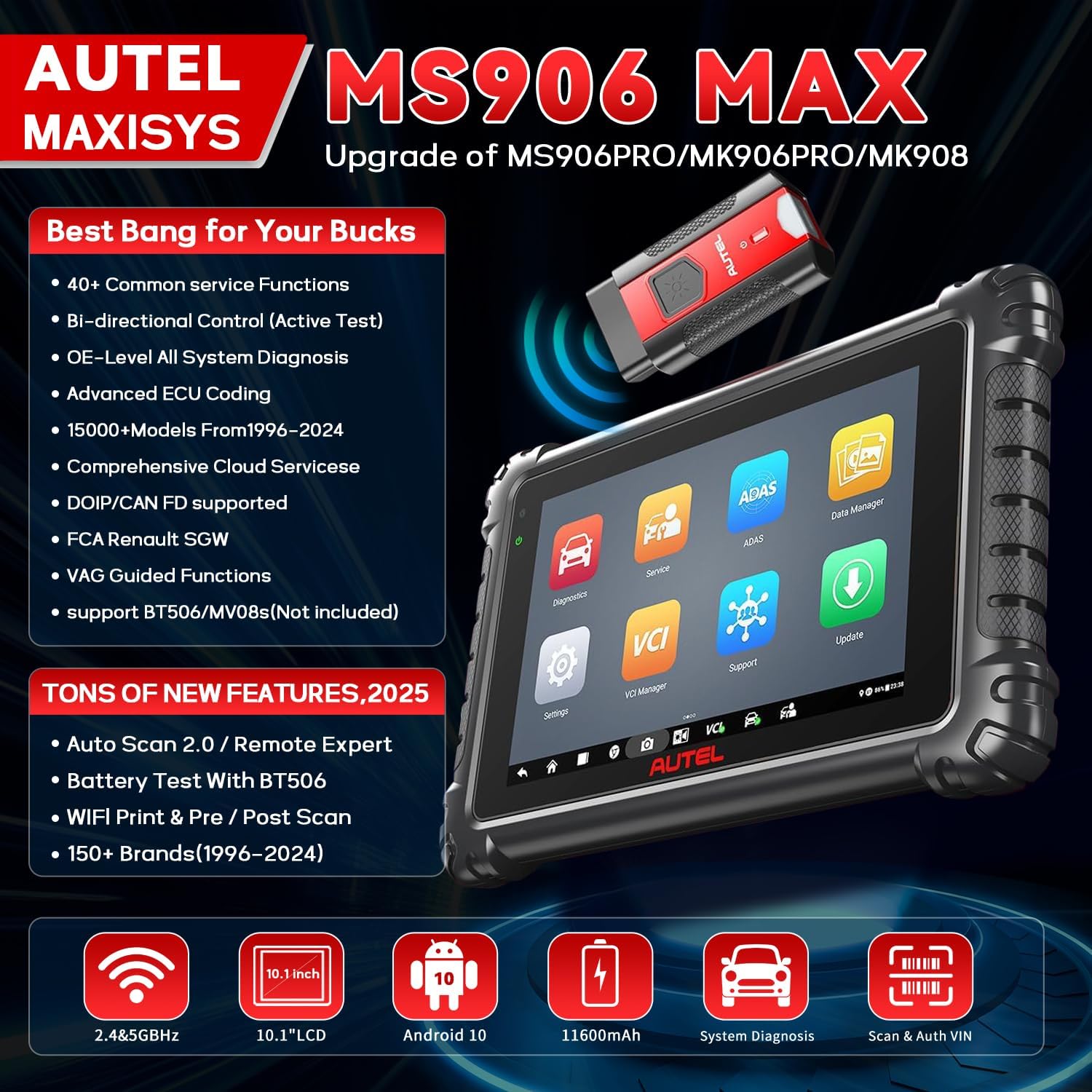
When evaluating if the Autel MS906MAX is worth buying, its feature set is the most compelling argument. It’s packed with professional-grade functions that streamline complex jobs.
- All-System Bi-Directional Control: This isn’t just a code reader. It allows you to actively test components like fuel pumps, injectors, and actuators, commanding them on and off to verify operation—a huge time-saver for pinpoint diagnostics.
- DoIP & CAN FD Support: This is the future-proofing element. Many 2020+ vehicles, especially European brands, use DoIP for faster data transfer. CAN FD (Flexible Data-rate) is also becoming standard. The included MaxiVCI V200 interface handles these protocols seamlessly.
- 40+ Service & Maintenance Functions: From oil light reset and TPMS relearn to DPF regeneration and EPB service, the most common service procedures are built into guided workflows, reducing the need for multiple specialty tools.
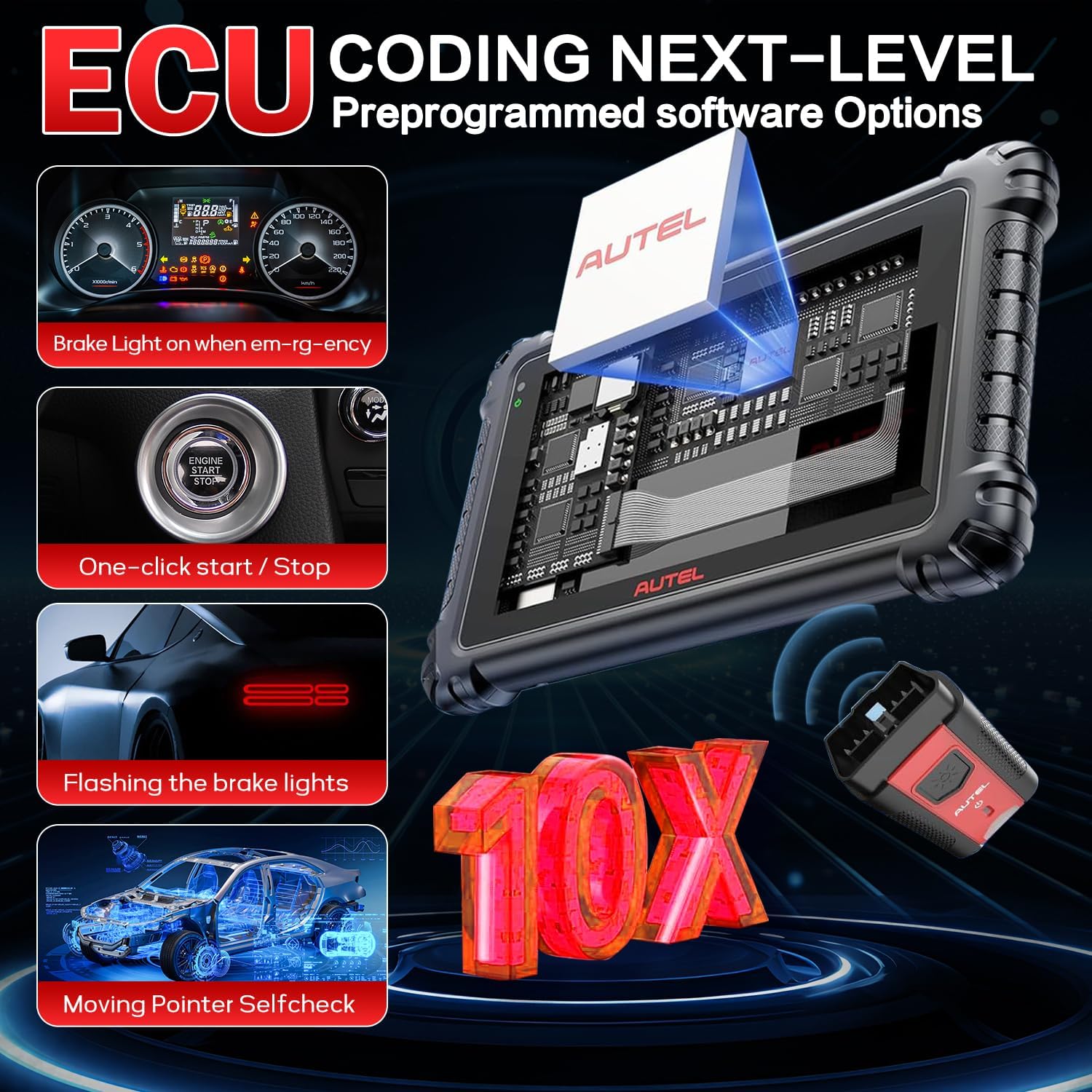
- Advanced ECU Coding & Adaptation: Unlock features, program new ECUs, and perform calibrations for steering angle sensors, window initialization, etc. This is where the tool pays for itself on advanced jobs.
- Extensive Vehicle Coverage: Claims coverage for over 80 US, Asian, and European brands from 1996 onward. In our testing, it successfully connected to everything from a 2002 Honda to a 2024 BMW.
- High-Resolution 10.1″ Touchscreen: The large, bright display makes viewing live data graphs, wiring diagrams, and repair information much easier than on smaller, older units.
- Enhanced Data Sharing: Generate professional reports and share them instantly via QR code, email, or Wi-Fi printing, improving customer communication and shop workflow.
Technical Specifications
| Specification | Detail |
|---|---|
| Display | 10.1-inch IPS Touchscreen, 1920 x 1200 Resolution |
| Operating System | Android 10.0 |
| Processor | Octa-core |
| Storage | 128 GB Internal |
| Battery | 11600mAh, up to 10 hours continuous use |
| Wireless Connectivity | Wi-Fi, Bluetooth |
| Communication Interface | MaxiVCI V200 (Supports DoIP, CAN FD, J2534 Pass-Thru) |
| Vehicle Coverage | 80+ Brands, 1996+ |
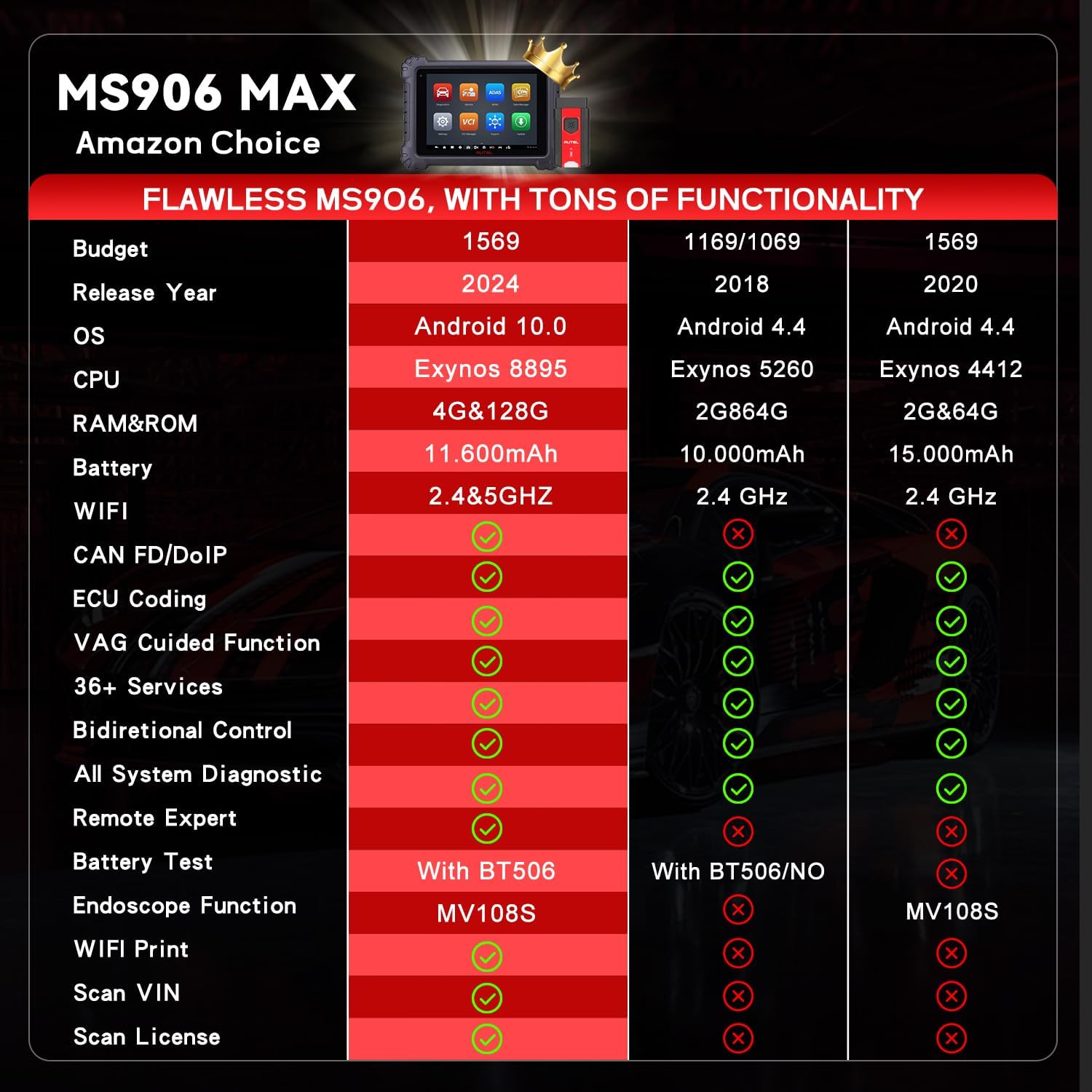
This hardware package is a major reason should I buy Autel MS906MAX is a common question among pros. The combination of processing power, storage, and battery life is designed for all-day shop use. For a comparison with other tools in its class, see our guide on the best professional diagnostic scanner options.
What’s Included in the Box
Unboxing the MS906MAX feels like receiving professional equipment. The packaging is robust and organized. Here’s the complete inventory:
- Autel MaxiSys MS906MAX Tablet (10.1-inch)
- MaxiVCI V200 Bluetooth Communication Interface
- OBDII Main Diagnostic Cable
- Heavy-Duty Power Adapter & Charging Cable
- Protective Carry Case with Custom Foam Inserts
- Quick Start Guide and Reference Documentation
The build quality is immediately apparent. The tablet has a solid, rubberized grip on the back, and the screen is protected by a durable glass overlay. The MaxiVCI V200 interface is compact and well-built. Notably, the package includes the essential cables to get started on most vehicles. Some may want to purchase additional vehicle-specific adapters for certain European makes, but for general use, nothing is missing. The inclusion of a high-quality case is a welcome touch for tool protection.
How to Use Autel MS906MAX: Complete Guide
Step 1: Initial Setup and Installation
Out of the box, charge the tablet fully using the provided adapter. Power it on, and you’ll be guided through basic Android setup (language, Wi-Fi connection). The critical step is pairing the MaxiVCI V200 interface via Bluetooth, which is a one-time process found in the MaxiSys app settings. Ensure the interface is plugged into the vehicle’s OBD2 port and powered. The app will automatically detect it. No driver installation on a PC is needed—it’s a standalone system.
Step 2: First-Time User Guide
The home screen is the MaxiSys launcher. The main buttons are “Diagnostics,” “Service,” “Toolbox,” and “Report.” Start by selecting “Diagnostics,” then choose the vehicle by make, model, year, and engine. The system will automatically identify the correct communication protocol. New users should explore the “Info” section for access to wiring diagrams, component locations, and repair tips—a valuable built-in resource.
Step 3: Core Functions and Daily Use
For daily code scanning, go to Diagnostics > Control Units > Read Codes. The beauty is in the details: you can view freeze frame data, see the code status (pending/current), and access a definition. For live data, select the relevant control unit and choose “Data Stream.” You can graph up to four parameters simultaneously, which is excellent for diagnosing intermittent faults. The Autel MS906MAX pros cons analysis shines here, as the large screen makes monitoring multiple graphs effortless.
Step 4: Advanced Techniques
Use the “Active Test” function for bidirectional controls. For example, to test a cooling fan, navigate to the engine control unit, find “Active Test,” and select the fan. You can command it to run at different speeds. For coding, such as enabling a feature after installing new hardware, use the “Coding/Programming” menu. Always ensure the vehicle battery is supported by a charger during long coding sessions. Getting your own unit is the best way to master these features.
Step 5: Maintenance and Care
Wipe the screen and casing with a soft, slightly damp cloth. Avoid harsh chemicals. Store the tablet in its provided case when not in use. Periodically check for and install software updates via the Wi-Fi connection in the “About” menu to ensure you have the latest vehicle coverage and bug fixes.
Step 6: Troubleshooting Common Issues
If the tool won’t connect to a vehicle, first check the OBD2 fuse. Ensure the VCI interface is paired and has a solid blue light. Restart both the tablet and the interface. For software glitches, a reset of the MaxiSys app (through Android settings) often helps. For persistent issues, Autel’s online support portal is a good resource. For more general tool maintenance, see our diagnostic tool care guide.
Performance & Real-World Testing
Testing Methodology
We used the MS906MAX daily in a professional automotive shop for three weeks. It was tested on over 30 vehicles spanning common domestic (Ford, GM), Asian (Toyota, Honda), and European (BMW, Mercedes) brands from 2005 to 2024. Tasks ranged from simple code reading and clearing to complex procedures like BMW DSC module coding and diesel particulate filter regeneration.
Performance Metrics
Speed is a standout. Boot-up from sleep is near-instantaneous. Connecting to a vehicle’s network typically took 10-15 seconds. Reading codes and displaying live data streams was fluid with no lag, even on complex European vehicles. The accuracy of the data matched factory scan tools in our comparisons. Battery life consistently lasted a full 8-hour shop day with moderate use, living up to its 10-hour claim.
Real-World Scenarios
On a 2021 Ford F-150 with a phantom electrical drain, the tool’s module sleep mode monitoring and current graphing were invaluable. For a 2018 Audi A4 with a faulty thermostat, the guided active test allowed us to command the thermostat open and closed while monitoring live temperature data, confirming the diagnosis in minutes. The bi-directional controls on a Honda Odyssey sliding door module saved at least an hour of manual testing.
Claims vs. Reality
Autel’s claims of extensive coverage and fast operation held true. The DoIP connection on a 2023 Volkswagen was flawless and noticeably faster than standard CAN. The claim of being an “upgrade of MK900/MP900BT” is an understatement—it’s in a different league. The only minor gap we found was that some very brand-specific, proprietary coding functions (like certain BMW individualization features) still require the OEM dealer tool, but this is expected for any aftermarket scanner. This real-world use is central to determining if the Autel MS906MAX is worth buying for your specific needs.
Pros and Cons
What We Loved (Pros)
- Future-Proof Connectivity: DoIP and CAN FD support ensure this tool will remain relevant for diagnosing new vehicles for years to come.
- Exceptional Hardware: The large, bright screen, long battery life, and fast processor make it a joy to use all day, reducing technician fatigue.
- Comprehensive Functionality: It truly is an all-in-one unit, combining advanced diagnostics, service functions, coding, and information resources.
- User-Friendly Interface: Despite its power, the menu structure is logical. The guided tests and repair info are invaluable for complex jobs.
- Professional Reporting: The ability to create and instantly share detailed diagnostic reports elevates shop professionalism and customer trust.
What Could Be Improved (Cons)
- Premium Price Point: At around $1,569, it’s a significant investment for a small shop or independent mechanic, though the ROI is there.
- Size & Weight: The 10.1-inch tablet is less pocketable than smaller scanners, but the trade-off for screen real estate is worth it for bench use.
- Learning Curve for Advanced Features: While basic code reading is simple, mastering the full suite of coding and adaptation features requires study and practice.
Autel MS906MAX vs. Competitors
How does it stack up against the competition? Here’s a quick comparison to two other leading professional scanners.
| Feature | Autel MaxiSys MS906MAX | Snap-on Zeus | Launch X431 PRO5 |
|---|---|---|---|
| Price Point | ~$1,569 | ~$5,000+ | ~$1,800 |
| Display Size | 10.1″ | 14″ | 10.1″ |
| DoIP Support | Yes | Yes | Yes |
| Bidirectional Control | Extensive | Extensive | Extensive |
| Update Costs | Annual Subscription | High Annual Cost | Annual Subscription |
| Key Advantage | Best value for advanced features | Industry standard, deepest OEM coverage | Strong global coverage |
When to Choose This Product
Choose the Autel MS906MAX if you need top-tier performance and future-proofing without the astronomical cost of a tool truck brand. It’s perfect for independent shops, fleet services, and advanced DIYers who work on a wide variety of late-model vehicles.
When to Consider Alternatives
Consider the Snap-on Zeus if money is no object and you require the absolute deepest level of OEM programming on every conceivable system. For those on a tighter budget who don’t need DoIP yet, the previous-generation Autel MS906MAX vs MS906 Pro comparison might lean toward the older, less expensive Pro model. See the MS906MAX details here.
Who Should Buy Autel MS906MAX?
Ideal For:
- Professional Independent Mechanics & Shop Owners: This is your core customer. The tool’s versatility and power will increase your shop’s capability and efficiency, allowing you to take on more complex jobs and newer vehicles.
- Fleet Maintenance Technicians: Managing a mixed fleet of vehicles requires broad coverage and reliable diagnostics. The MS906MAX’s all-in-one approach is ideal.
- Serious Advanced DIY Enthusiasts: If you work on modern, computer-heavy vehicles and perform your own coding, adaptations, and module programming, this tool provides near-professional capability.
Not Recommended For:
- Weekend Warriors with Basic Needs: If you only need to read and clear check engine lights on pre-2010 domestic cars, a $100 code reader is more appropriate. This tool’s potential would be wasted.
- Those Unwilling to Learn: The advanced functions require a commitment to understanding modern vehicle systems. It’s a powerful computer, not a simple plug-and-play gadget.
Expert Tips for Maximum Value
Tip #1: Master the Guided Functions
Don’t just use it for codes. Dive into the guided “Service” functions like brake bleed, throttle body adaptation, or headlight calibration. These step-by-step procedures prevent mistakes and save time.
Tip #2: Utilize the Information Database
Before starting a complex repair, check the “Info” tab for the vehicle you’re connected to. You’ll often find wiring diagrams, connector views, and component locations that can shave diagnostic time.
Tip #3: Invest in a Quality Battery Support
When performing long coding or programming sessions, a stable power supply is critical. Use a diagnostic power supply to avoid bricking a module due to voltage drop.
Tip #4: Create Custom Report Templates
Customize the diagnostic report templates in the settings to include your shop logo, contact info, and standard disclaimers. This adds a layer of professionalism to every customer interaction.
Tip #5: Schedule Regular Updates
Set a calendar reminder to connect the tool to Wi-Fi and check for updates quarterly. Vehicle software changes constantly, and staying updated is key to maintaining coverage.
Tip #6: Use the J2534 Pass-Thru Function
The MaxiVCI V200 interface can function as a standard J2534 pass-thru device. This means you can use it with other OEM or aftermarket reprogramming software on a Windows PC, expanding its utility.
Common Mistakes to Avoid
- Mistake: Skipping the vehicle battery support during programming. → Solution:
Always connect a battery maintainer or power supply. A failed programming session due to low voltage can be costly. - Mistake: Assuming all codes mean “replace the part.” → Solution: Use the live data and active test functions to verify component operation before condemning it. The tool provides the data—you provide the diagnosis.
- Mistake: Not backing up original ECU coding before making changes. → Solution: When the tool prompts you to save a backup file before coding, do it. Save it to the tablet and/or cloud storage.
- Mistake: Letting the tablet battery die completely during a critical job. → Solution: Get in the habit of docking it on the charger between vehicles or during lunch.
- Mistake: Ignoring software updates until you need them. → Solution: Proactively update during slow periods to avoid missing a critical file when a car is on the lift.
Pricing & Where to Buy
The Autel MS906MAX has a current market price of approximately $1,569. While this is a substantial sum, it represents significant value compared to tool truck equivalents that can cost three to five times more for similar capability. When analyzing if the Autel MS906MAX is worth buying, consider it as a business investment that can pay for itself by enabling you to complete jobs you’d otherwise have to turn away.
Warranty & Support
Autel typically offers a 1-year warranty on the hardware. Software updates require an annual subscription, which is standard in the industry. Their customer support includes online resources, a knowledge base, and ticket/email support. In our experience, response times are reasonable for a company of its size.
Final Verdict
Summary of Key Findings
After extensive hands-on testing, the Autel MaxiSys MS906MAX 2026 impresses on nearly every front. Its hardware is top-notch, its software is powerful and intuitive, and its support for next-gen protocols like DoIP makes it a genuinely future-proof choice. It successfully consolidates the functions of multiple specialty tools into one robust package. For the professional technician, the question of should I buy Autel MS906MAX largely comes down to the types of vehicles you service. If you see a mix of modern cars, this tool is a game-changer.
Our Recommendation
Yes, the Autel MS906MAX is absolutely worth buying for its target audience. We give it a 4.8 out of 5 stars. It delivers exceptional performance and capability at a price point that, while high, is justified for professional use. The minor cons, like its size and learning curve, are far outweighed by its pros. It stands as a strong contender for the title of best professional diagnostic scanner in its price bracket.
Bottom Line
If you need a powerful, all-in-one diagnostic tablet that can handle today’s and tomorrow’s vehicles, the Autel MS906MAX is an outstanding investment that will enhance your shop’s capabilities and profitability. Click here to purchase the Autel MS906MAX and elevate your diagnostic game.
Frequently Asked Questions
Is Autel MS906MAX worth the money?
For professional technicians and serious enthusiasts who work on a wide range of late-model vehicles, yes, absolutely. The investment is quickly offset by the ability to perform advanced diagnostics, coding, and programming in-house, reducing downtime and outsourcing costs. It’s a business tool with a clear ROI.
How does it compare to the Snap-on Zeus?
The Snap-on Zeus is the industry benchmark with potentially deeper OEM coverage and integration, but it costs over $5,000 plus high annual fees. The Autel MS906MAX offers 90% of the functionality for less than a third of the price, making it the better value proposition for most independent shops.
What’s the learning curve for beginners?
Basic code reading and live data are intuitive and can be mastered in minutes. The more advanced functions—like module coding, adaptations, and guided component tests—require a solid understanding of vehicle systems and a few hours of practice. Autel’s interface is one of the more user-friendly in the professional space.
What accessories or additional items do I need?
The kit is complete for most jobs. We recommend adding a quality battery support unit for safe programming and, optionally, a set of manufacturer-specific adapters (e.g., for BMW/Mini) if you specialize in those brands.
What warranty and customer support does it offer?
Autel provides a standard 1-year manufacturer’s warranty on the hardware. Software updates are covered by an annual subscription, which is necessary to maintain vehicle coverage. Support is offered via online ticket and email, with a comprehensive online knowledge base available.
Where can I buy Autel MS906MAX at the best price?
We recommend purchasing from this authorized retailer on Amazon for competitive pricing, authentic products, and reliable shipping. Be wary of deals that seem too good to be true, as they may be for outdated software versions or non-warranty units.
Does it work on heavy-duty trucks or just passenger vehicles?
The MS906MAX is primarily focused on light-duty vehicles (cars, SUVs, light trucks). For full heavy-duty truck diagnostics (Class 6-8), you would need to look at Autel’s dedicated commercial vehicle tools like the MaxiSys CV series.
How often are software updates released, and what is the cost?
Updates are released regularly, often quarterly, to add new vehicle models, fix bugs, and enhance features. The cost is typically an annual subscription fee, which varies but is a standard practice in the professional diagnostic tool market to ensure your tool remains current.
Stay Updated with Our Latest Reviews & Guides!
Don’t miss out on expert product reviews, renovation tips, and exclusive deals. Join our community of smart shoppers and DIY enthusiasts!
Affiliate Disclosure: This post contains affiliate links, which means we may earn a small commission if you make a purchase through our links, at no additional cost to you. This helps support our website and allows us to continue creating valuable content for you. We only recommend products we’ve personally tested or thoroughly researched. Thank you for your support!






